
October 19: Plank output and storage purchases
Carpentry's tool upgrade now increases Plank output, rather than Twig production. If you are buying it to solve a Twig shortage, compare the current effect before spending. Wood, Twigs and finished Planks are separate parts of the plan.
Reinforced Beds and Reinforced Rows use Planks and provide up to +100% Seeds and Popcorn respectively. Covered Storage extends the offline limit through 9, 10 and 12 hours and also needs Wood. Choose between production and a longer collection window according to how often you return; a larger offline limit is not itself a promise that every workshop action runs off-map.
The Nest's Project Bookcase adds +25% Carpentry crafting XP, including automatic crafting. It is an XP benefit, separate from the tool's Plank-output benefit. Echo's Nest branch adds another set of mushroom and Twig choices; use the Echo Field guide to compare that branch instead of treating all Nest purchases as the same multiplier.
Level 10 and the workshop belong together
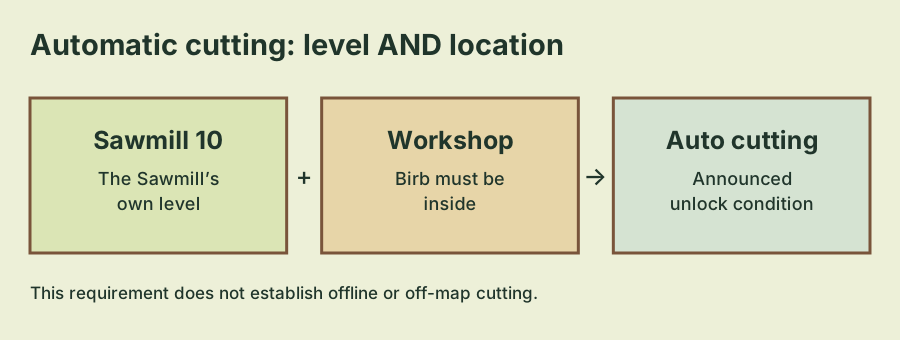
The September 26 update states: automatic cutting unlocks at Sawmill level 10 while inside the workshop. There are two pieces to check, the Sawmill's level and Birb's workshop location. A level check alone leaves out part of the developer's description.
If you reached level 10 and expected cutting to continue wherever Birb goes, begin by returning to the workshop and checking the behavior there. The announcement describes the feature with that location condition. It does not promise cutting on every map or while the game is closed.
This is a useful boundary for troubleshooting. Compare the feature in the place where it is announced to work before treating its absence elsewhere as a defect. Equally, do not treat being inside the workshop as a substitute for reaching the required Sawmill level.
Check the feature in a simple order
Use the named conditions to isolate what is missing. The sequence below is a troubleshooting order, not a claim that the game has a special hidden activation ritual.
- Check that the Sawmill itself is at level 10, rather than another workshop or nest upgrade.
- Check that Birb is inside the workshop where the feature is described to work.
- Read any current requirement or status text shown for cutting.
- Observe the result before changing several upgrades at once.
- If the displayed conditions are met but the behavior contradicts them, record the level, location and current status for a support report.
| Situation | Next check |
|---|---|
| Sawmill below level 10 | The announced level requirement is still ahead. |
| Sawmill level 10, Birb elsewhere | Check automatic cutting inside the workshop. |
| Inside the workshop, but another upgrade is level 10 | Verify the Sawmill's own level. |
| Level 10 and workshop conditions met | Look at the current cutting status and any remaining on-screen requirement. |
The patch does not document every possible resource or status message in the cutting interface. If the game shows a further condition, follow that current message rather than assuming the two-line patch description is a complete UI manual.
Wood collection, Planks and nest upgrades are different tasks
The same update adds Wood collection, Carpentry projects, permanent decorations, the Sawmill and Plank production. It also adds repeatable nest expansion upgrades. These features belong to the broader nest-and-carpentry update, but the announcement names them separately.
Be precise about the resource or behavior you are trying to improve. Producing Planks is not the same question as unlocking automatic cutting. Completing a decoration is not, by itself, proof that the Sawmill reached level 10. A nest tier also does not replace the specific Sawmill level requirement.
For the nest's next tier, use the Nest Tier IV and Evolution VI guide. That page covers the evolution gate and Golden Popcorn upgrade automation. These are different from the Sawmill's workshop-dependent cutting feature.
Carpentry Efficiency no longer raises repeatable prices
The October 2 changelog changes an important pricing interaction: Carpentry Efficiency no longer increases repeatable upgrade prices; each upgrade's cost depends on its own level. If you are returning with notes from before that update, this is the pricing rule to recheck.
The change removes the old interaction named in the announcement. It does not provide a complete price table or an optimal purchase sequence. Compare the cost shown for the specific upgrade you are considering and its own current level, rather than using an older assumption that Carpentry Efficiency must raise all repeatable prices.
Keep a cost observation tied to the upgrade it describes. Two upgrades at different levels may not offer a meaningful comparison, and a price remembered from another save may refer to a different level. The announcement's wording supports checking each upgrade individually; it does not establish that all upgrades cost the same at the same level.
If you are deciding how to spend resources, start with your immediate objective. For automatic cutting, the verified target is Sawmill level 10 with the workshop condition. For a particular decoration or repeatable expansion, use the current project's own requirements. This avoids importing an unsupported universal buying order into several distinct tasks.
Automatic does not establish offline production
The word automatic can describe an action that runs without repeated manual input while a stated condition is met. Here the developer supplies that condition: being inside the workshop at the required Sawmill level. The linked update does not say the same action continues while the application is closed.
Check the workshop’s active cutting condition separately from Covered Storage’s offline limit before choosing your next purchase.
To check the announced feature, observe it in the workshop first. If you are investigating another situation, such as a background session, describe that situation separately when asking for clarification. An observation made while the game is open should not silently become a rule for a closed game.
What to preserve if cutting still does not work
A useful report includes the Sawmill level, whether Birb is inside the workshop, the platform, any displayed status and whether the save was recently transferred. These details let the developer distinguish an unmet condition from behavior that contradicts the current interface.
If progress looks different after moving to Steam, first use the save-transfer guide to identify the active copy and retain a backup. Reimporting random files is not a documented Sawmill fix. Resolve a save comparison before drawing conclusions about which upgrades your current Birb has completed.
The level and location conditions above come from the September 26 content update. The pricing correction comes from the October 2 release changelog. A newer developer update or more specific current requirement can refine these rules; an older guide's assumptions should not override them.
Developer sources
The dated developer updates below cover the requirements described in this guide.
- September 26, 2026 — content update — Developer announcement: Evolution VI, Nest Tier IV, Parrot Rebirb III, the Sawmill and expanded Mine progression.
- October 2, 2026 — Steam release — Developer announcement: web-to-Steam transfer, the Geode Helmet, save-conflict closing and Carpentry pricing changes.